A chatbot that calls an LLM API takes an afternoon to build. Hiring managers have seen hundreds of them, so it no longer sets one candidate apart. What does stand out is a shipped system: an agent (an LLM that plans steps and calls tools to act) that is tested against failure cases and runs behind a deployed API.
This post walks through the Gen AI & Agentic AI projects for portfolio building in the Bosscoder Applied Gen AI & Agentic AI Program, what each one shows employers, and how to present it. Each entry lists its stack, so you can judge the depth yourself.
Short answer: The best Gen AI & Agentic AI projects for portfolio pair a real use case with tool use, an evaluation result, and a deployed service. The Bosscoder Applied Gen AI program has you build twelve such projects, most sized at about six hours each.
Applied Gen AI & Agentic AI Projects for Portfolio: What Hiring Managers Check
A credible Gen AI engineer portfolio passes six checks:
- A real use case. A named problem, not a generic "chat with your PDF."
- Tool use. The model asks your code to run a function or API (tool calling). Orchestration, the code that controls step order and state, ties the steps together.
- Evaluation and guardrails. Evals are automated tests that score output quality. Guardrails block unsafe or malformed responses.
- Deployment. A running service, not a notebook.
- Documentation. Architecture, setup steps, and trade-offs written down.
- Measurable results. Cost, latency, or quality numbers before and after a change.
Hands-On Projects You’ll Build for Your Portfolio
Each project is scoped as a focused build, and most take about six hours.
1. Prompt Evaluation Lab (6 hours)
- Problem: Choosing a prompting method by gut feel.
- Stack: OpenAI/Anthropic API, tiktoken, Pydantic.
- Build: Test chain-of-thought, self-consistency, and tree-of-thought prompting against a zero-shot baseline. Find the best cost-quality trade-off per task type.
- Resume bullet (add your numbers): Evaluated three prompting strategies against a zero-shot baseline on [n] tasks; picked per-task methods that cut cost by [x]%.
You compare chain-of-thought, self-consistency and tree-of-thought prompting against a plain zero-shot baseline instead of choosing a method by feel. The result is a cost-versus-quality view for each task type. You use the OpenAI/Anthropic API, tiktoken to count tokens, and Pydantic for structured outputs. It is your first proof that you measure prompts rather than guess.
2. Enterprise Support Assistant (6 hours)
- Problem: Support bots that break under adversarial users.
- Stack: OpenAI/Anthropic API, Presidio, Anthropic prompt caching.
- Build: Build a multi-turn assistant with a system-prompt role contract. Then red-team it (attack your own system) with 8 classes of prompt injection and jailbreak attacks.
- Resume bullet (add your numbers): Built a support assistant and red-teamed it against 8 attack classes; it held against [x] of 8.
You build a multi-turn support assistant whose behavior is set by a system-prompt role contract. Then you attack it with 8 classes of prompt injection and jailbreak attempts. The stack includes the OpenAI/Anthropic API, Presidio and Anthropic prompt caching. It shows employers that you test for failure before you ship.
3. The Model Bake-Off (8 hours)
- Problem: Lock-in to one LLM provider, with unknown cost and latency.
- Stack: OpenAI SDK, Anthropic SDK, asyncio.
- Build: Build a provider-agnostic LLM client with async streaming and prompt caching. Compare cost and latency across OpenAI and Anthropic.
- Resume bullet (add your numbers): Built a provider-agnostic LLM client with streaming and caching; benchmarked median latency at [x] ms vs [y] ms.
You write one LLM client that works with both the OpenAI and Anthropic SDKs, with async streaming and prompt caching. Then you use it to compare cost and latency across the two providers. At 8 hours, it is the longest project in the list. It shows you can switch providers and back the choice with numbers.
4. The Resilient Ingestor (6 hours)
- Problem: Pipelines that fail halfway through a flaky API.
- Stack: httpx + asyncio, tenacity, Pydantic.
- Build: Build a fault-tolerant async pipeline that pulls 50,000 paginated records from a flaky API, with retries and checkpointing.
- Resume bullet (add your numbers): Built an async pipeline ingesting 50,000 paginated records with retries and checkpointing; resumed cleanly after [x] failures.
You pull 50,000 paginated records from a flaky API using httpx and asyncio. Tenacity handles retries and checkpointing lets the run recover instead of starting over, with Pydantic in the stack. It shows the reliability work that LLM data pipelines depend on and that tutorials usually skip.
5. The Policy Assistant (6 hours)
- Problem: Answers buried in long policy documents.
- Stack: LangChain (LCEL), Chroma, Qdrant/Pinecone.
- Build: A production RAG project over company policy documents, with chunking, embeddings and vector retrieval. RAG means the model answers from retrieved documents, not from memory.
- Resume bullet (add your numbers): Built a RAG pipeline over policy documents with LangChain and a vector database; [x]% of test questions answered with correct sources.
You build a RAG pipeline over company policy documents. It splits the documents into chunks, creates embeddings, stores them in a vector database and retrieves the right passages for each question. The tools are LangChain (LCEL), Chroma and Qdrant or Pinecone. It is the starting point for the retrieval projects that follow.
6. The Retrieval Bake-Off (6 hours)
- Problem: Retrieval that returns plausible but wrong passages.
- Stack: Hybrid search (BM25), cross-encoder reranking, RAGAS.
- Build: Improve retrieval with hybrid BM25 plus vector search and cross-encoder reranking. Measure each change with RAGAS evaluation.
- Resume bullet (add your numbers): Improved RAG retrieval with hybrid search and reranking; RAGAS [metric] rose from [x] to [y].
You take a RAG pipeline and improve its retrieval with hybrid search (BM25 keyword search plus vector search) and cross-encoder reranking. Each change is scored with RAGAS, a set of RAG evaluation metrics, so you can show what actually helped. It proves you improve systems with evidence, not opinion.
7. The Multi-Hop Investigator (6 hours)
- Problem: Questions that need evidence from several sources.
- Stack: LangGraph, Cohere Rerank, RAGAS.
- Build: A multi-hop RAG agent that decomposes complex questions, retrieves evidence across hops, and grounds answers with citations.
- Resume bullet (add your numbers): Built a multi-hop RAG agent in LangGraph that decomposes questions and cites sources; RAGAS [metric] of [x].
You build an agent for questions that one passage cannot answer. It breaks the question into parts, retrieves evidence over several hops and writes an answer with citations. LangGraph runs the flow, Cohere Rerank improves retrieval and RAGAS scores the result. It is one of your clearest agent-design projects.
8. The Specialist (6 hours)
- Problem: Large general models are costly for narrow tasks.
- Stack: Hugging Face Transformers, Axolotl, PEFT (LoRA/QLoRA).
- Build: Fine-tune a small open-source model with LoRA/QLoRA so it outperforms a larger general-purpose model on one narrow task.
- Resume bullet (add your numbers): Fine-tuned [model] with QLoRA to beat [larger model] on [task]: [x] vs [y] on a held-out set.
You fine-tune a small open-source model with LoRA/QLoRA, using Hugging Face Transformers, PEFT and Axolotl. The aim is to beat a larger general-purpose model on one narrow task. It shows you can judge when a small tuned model is the better choice on cost and performance.
9. The Operations Agent (6 hours)
- Problem: Agents that call tools with no oversight.
- Stack: OpenAI/Anthropic SDK, MCP, Pydantic.
- Build: A tool-calling agent built on MCP servers (Model Context Protocol, a standard way to expose tools to models). An arbiter layer gates and evaluates its actions.
- Resume bullet (add your numbers): Built a tool-calling agent on MCP servers with an arbiter layer; blocked [x] unsafe actions across [n] test runs.
You build an agent that calls tools through MCP servers, a standard way to expose tools to a model. An arbiter layer gates and evaluates each action the agent wants to take. It shows you can give an agent real capabilities while keeping control over what it is allowed to do.
10. The Claims Desk (6 hours)
- Problem: Multi-step claims need memory and human sign-off.
- Stack: LangGraph, LangGraph Checkpointers, Postgres.
- Build: A stateful claims-processing agent in LangGraph with persistent memory and a human-in-the-loop approval step.
- Resume bullet (add your numbers): Built a claims-processing agent with Postgres checkpointing and human approval; [x] of [n] test claims completed end to end.
You build a claims-processing agent in LangGraph that keeps its state between steps, using checkpointers with Postgres. It includes a human approval step before it continues. It shows stateful workflows and human-in-the-loop control, which matter in any process that involves money or risk.
11. The Service (6 hours)
- Problem: Notebook prototypes nobody else can run.
- Stack: FastAPI + Uvicorn, Docker + Compose, AWS ECS Fargate.
- Build: Turn a notebook prototype into a production-grade async API service, containerized and deployed with CI/CD.
- Resume bullet (add your numbers): Deployed [system] as an async FastAPI service on AWS ECS Fargate with Docker and CI/CD; median latency [x] ms.
You turn a notebook prototype into an async API service with FastAPI and Uvicorn. It is packaged with Docker and Compose and deployed on AWS ECS Fargate through CI/CD. It is the step from a prototype that works on your laptop to an endpoint someone else can call.
12. The Control Room (6 hours)
- Problem: No visibility into LLM cost, latency, or regressions.
- Stack: Prometheus + Grafana, LangSmith, OpenTelemetry.
- Build: An observability and evaluation stack for LLM systems with tracing, metrics dashboards, and CI-integrated evals.
- Resume bullet (add your numbers): Built tracing, dashboards and CI evals for an LLM service; caught [x] regressions before release.
You build the monitoring and testing layer for an LLM system. It has tracing with LangSmith and OpenTelemetry, metrics dashboards in Prometheus and Grafana, and evals that run in CI. It shows you can see what a model system is doing in production and catch regressions before release.
The program also ends with a capstone described as a fully deployed AI product. Module 5 covers multi-agent systems (CrewAI, supervisor and peer-to-peer orchestration), though no listed project names one.
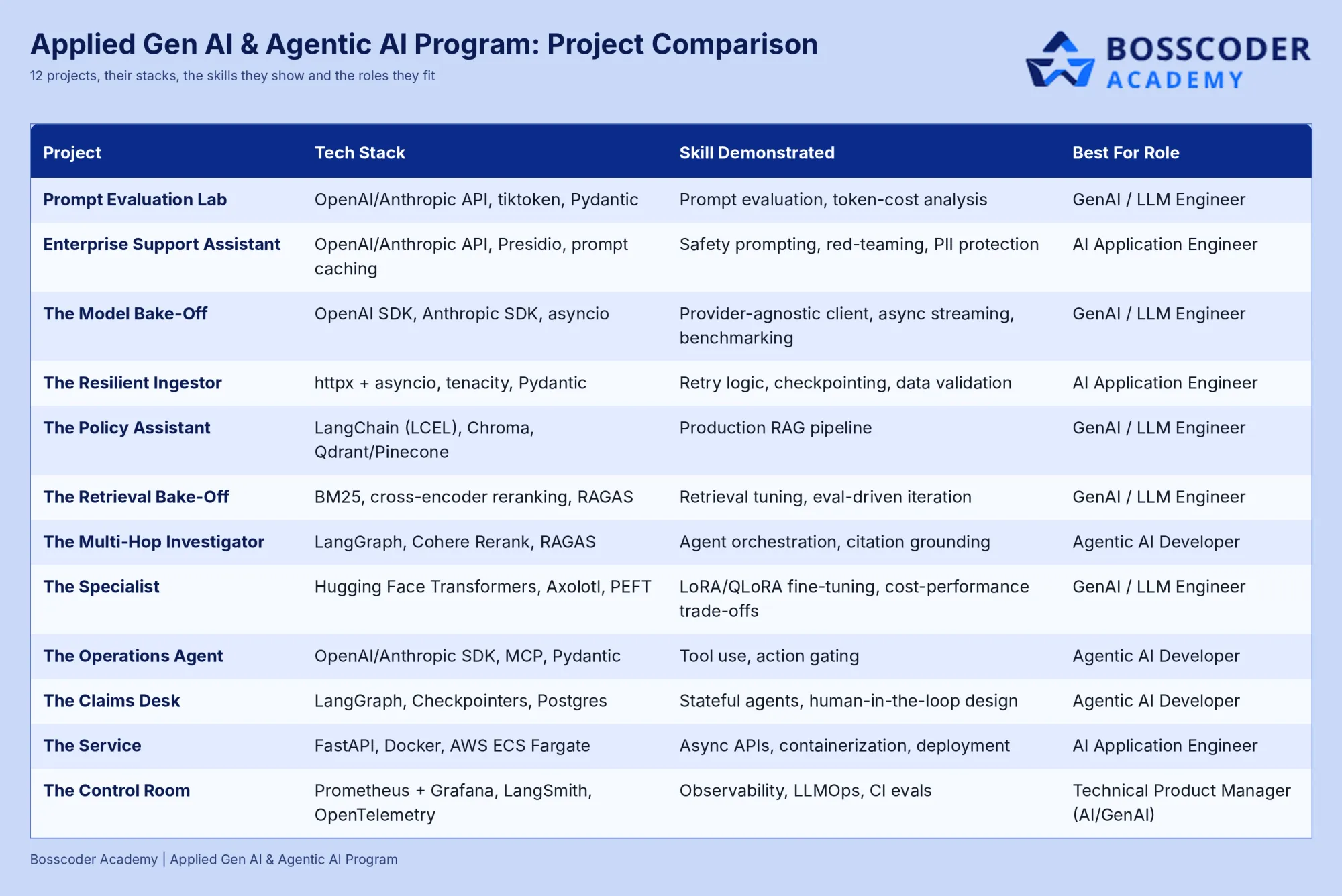
Project Comparison Table
How Mentorship Improves Project Quality
Mentors from top product-based companies guide learners through the whole program.
It starts with a goal-setting session at the start of the course. After each module, you have a personal one-on-one session with a mentor. Use it to take the project you just built and ask what a hiring team would question.
When you reach placement, the same mentors help with profile optimization and mock interviews, and they support referrals.
Outside feedback catches what tutorials miss, such as no evaluation baseline, weak guardrails or an undeployed demo. Treat each piece of feedback as README material: every fix is a trade-off you can explain in an interview.
How to Showcase These Projects: A README Template
Give every project the same six-part README:
- First line: the problem and the result in one sentence.
- Architecture diagram: components and what calls what.
- Stack and setup: how to run it, ideally in one command.
- Eval table: baseline versus final scores.
- Demo: a live endpoint or a two-minute video against the real deployment.
- Limits: what breaks and what you would fix next.
Pin your best three repositories on GitHub. On your resume, use only numbers you measured. For interviews, prepare one design decision, one failure and one trade-off per project.
Who This Program Is For
The program is built for software engineers, product managers, and other professionals, with no ML background required. Basic Python helps. If you are a working engineer who wants shipped Gen AI work to show, it fits.
Frequently Asked Questions (FAQS)
Q1. What are good agentic AI projects for a portfolio?
Pick projects with a real use case, tool use, evaluation, and deployment. Good examples are a RAG agent that cites sources, a tool-calling agent with an action gate, and a stateful workflow with human approval. Add observability to show you can run it in production.
Q2. Do I need machine learning experience to build Gen AI projects?
No. The program is built for people without an ML background and starts from Python fundamentals. Basic Python is helpful, and beginners should expect to learn the fundamentals in the first two weeks. That suits software engineers moving into Gen AI.
Q3. How many projects are in the Bosscoder Applied Gen AI & Agentic AI program?
The Bosscoder Applied Gen AI & Agentic AI Program lists twelve named projects, most about six hours each, plus a fully deployed capstone product. They span prompting, RAG, fine-tuning, agents, deployment, and observability. Together they cover the path from a first prompt to a monitored production service.
Q4. How long is the Bosscoder Applied Gen AI & Agentic AI program?
The Bosscoder Applied Gen AI & Agentic AI Program runs 6 to 7 months long, with live learning and industry projects. It lists six modules of two to four weeks each