Introduction
Computer Networks is one of the most important topics when it comes to technical interviews, especially for product-based companies like Amazon, Google, or Microsoft.
It’s not only about understanding the concepts or definitions; you need to have an idea about how these systems communicate with each other, especially in real-time scenario.
Whether it is loading a website, transferring data over the internet, or handling failures, communication plays a critical role. This is where Computer Networks play an important role. Questions on topics like TCP/IP, DNS, HTTP, or routing are commonly asked during interviews.
In this blog, we have compiled 45 curated Computer Networks interview questions. Each question has been explained in a simple, structured, and practical way, not only to help you answer them confidently but to understand them as w
Let’s start with the fundamentals and build your understanding step by step.
Basic Computer Networks Interview Questions
Before diving into interview questions, let’s start with the basics. These questions help build a strong foundation and are commonly asked in almost every interview.
1. What is a Computer Network?
A computer network is a group of devices connected to share data and resources. These devices can be computers, mobiles, or servers. Networks help in communication, file sharing, and internet access.
→ Devices are called nodes
→ Data is shared between devices
→ Example: Internet, WiFi
2. What is the OSI model?
The OSI model explains how data moves from one device to another. It has 7 layers, and each layer has a specific role in communication.
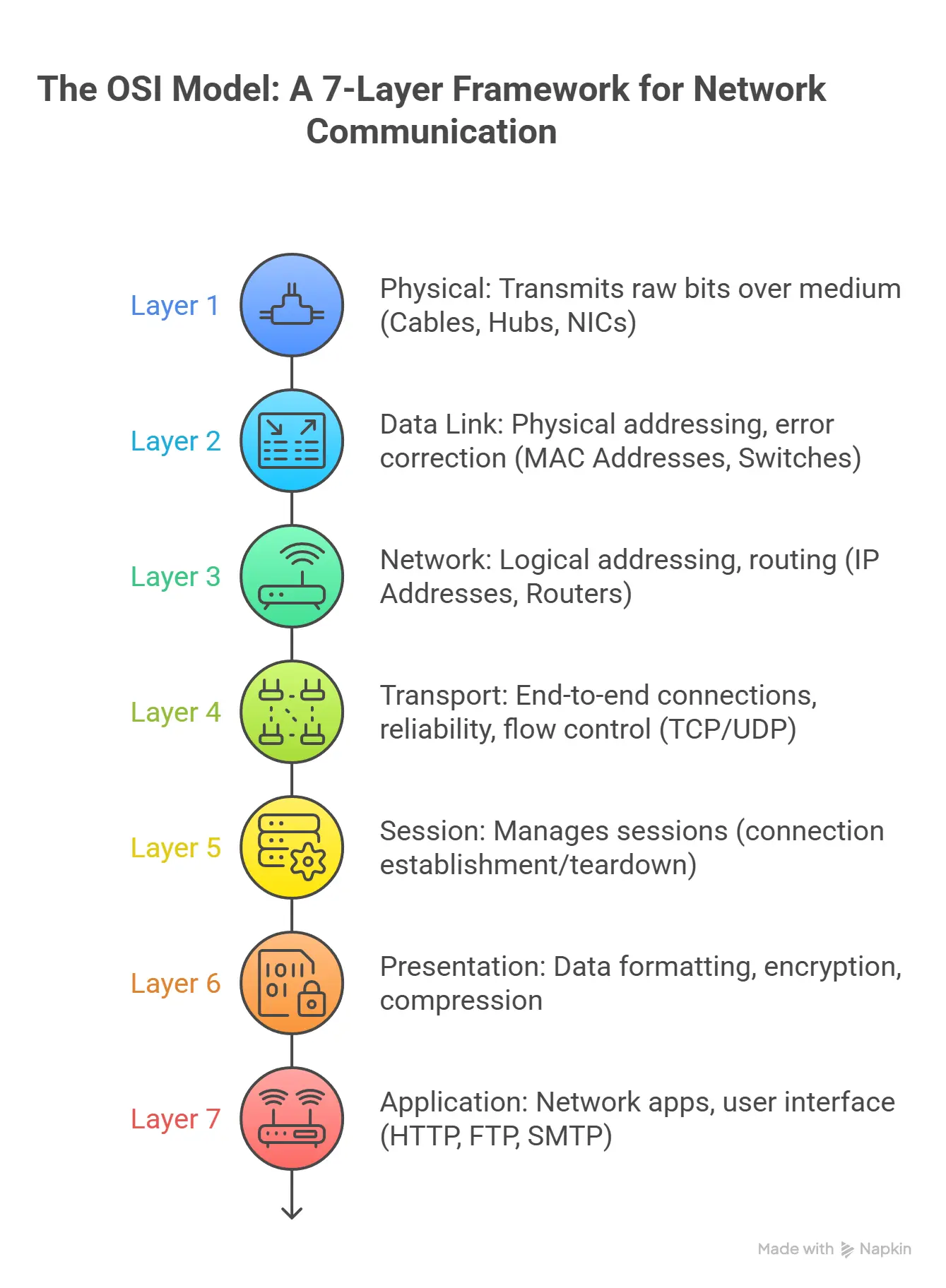
→ Helps in understanding network flow
→ Useful for debugging issues
→ Each layer has a defined function
3. What is TCP/IP Model?
The TCP/IP model represents the actual model used in real-world networks such as the internet. This model differs from the OSI model in the sense that, whereas the OSI model is purely theoretical, the TCP/IP model is based on the actual occurrence of data transmission. The TCP/IP model consists of four main layers: Application, Transport, Internet, and Network Access.
The main reason for the importance of this model is based on the fact that most modern applications depend on some form of communication involving TCP/IP. For example, when you try to access a website, you are first subject to the following process.
The TCP/IP model can be used when answering system design interview questions.
4. What is the difference between TCP and UDP?
| Feature | TCP (Transmission Control Protocol) | UDP (User Datagram Protocol) |
|---|---|---|
| Speed | Slower (checks data before sending) | Faster (no checking) |
| Reliability | High (guarantees delivery) | Low (no guarantee) |
| Connection | Connection-oriented | Connectionless |
| Error Handling | Detects & retransmits lost data | No error recovery |
| Order | Maintains correct order | Order not guaranteed |
| Used For | Web, Email, File transfer | Streaming, Gaming, Calls |
→ TCP ensures all data reaches safely and in order
→ UDP is used where speed matters more than accuracy
5. What is an IP address?
An IP address is a unique number given to each device in a network. It helps devices find and communicate with each other.
→ Works like a home address
→ Used to send and receive data
→ Example: 192.168.1.1
6. What happens when you type a URL in the browser?
When you type a URL, your request first goes to a DNS server, which returns the corresponding IP address. Then your system connects to that server.
Flow:
→ User enters domain name
→ DNS server lookup
→ IP address returned
→ Browser connects to server
In interviews, this question checks your understanding of how web requests actually work behind the scenes.
7. What is the difference between MAC address and IP address?
A MAC (Media Access Control) address is a unique physical address given to a device's network interface card (NIC). It is required for communication between devices in a local network (LAN).
Unlike IP addresses, which can change, MAC addresses are fixed and assigned by the manufacturer. They help devices identify each other at the data link layer.
Key Understanding:
→ IP address = Logical (can change)
→ MAC address = Physical (permanent)
When data is sent in a local network, devices use MAC addresses to ensure it reaches the correct hardware.
Interviewers ask this to test whether you understand the difference between logical and physical addressing.
8. How does a router work?
A router connects different networks and sends data in the right direction using IP addresses.
→ Connects local network to internet
→ Chooses best path for data
→ Acts as gateway
Routers are important in system design discussions when explaining how requests travel across networks.
9. What is the difference between a Switch and a Hub?
A switch is a networking device that helps connect multiple devices in a Local Area Network (LAN). A switch operates on the data link layer of the network and uses MAC addresses to send data to a specific device.
Unlike a hub that sends data to all the devices in a network, a switch sends data to a specific device.
Key Points:
→ Works on MAC address
→ Sends data to specific device only
→ Used in Local Area Network
This question is commonly asked to check your understanding of basic networking hardware.
10. What is HTTP vs HTTPS?
HTTP (HyperText Transfer Protocol) and HTTPS (HyperText Transfer Protocol Secure) are protocols used for communication between a browser and a server.
The main difference is security. HTTP sends data in plain text, while HTTPS encrypts the data using SSL/TLS, making it secure from attackers.
Key Differences:
→ HTTP → Not secure
→ HTTPS → Encrypted & secure
→ Ports → 80 (HTTP), 443 (HTTPS)
In real-world systems, HTTPS is always preferred, especially for login, payments, and sensitive data.
Interviewers ask this to test your understanding of web security basics.
If these basics are clear, try applying them in practice. A quick free MCQ test on Computer Networks can help you see how well you can solve real interview-style questions.
11. What is a port?
A port is a logical number used to identify a specific service or application on a device. While an IP address identifies the device, a port tells which application should receive the data.
→ IP = Device identity
→ Port = Application identity
→ Example: 80 (HTTP), 443 (HTTPS), 22 (SSH)
Ports allow multiple services to run on the same device without confusion.
12. What is bandwidth?
Bandwidth is the maximum amount of data that can be transferred over a network in a given time. It is usually measured in Mbps (Megabits per second).
→ Higher bandwidth = More data at once
→ Lower bandwidth = Slower transfer
→ Important for streaming and downloads
Note: Bandwidth is capacity, not actual speed.
13. What is latency?
The time delay between sending a request and getting a response from a server is known as latency, and it is measured in milliseconds.
→ Low latency = Faster response
→ High latency = Delay or lag
Important for gaming, video calls
Even with high bandwidth, high latency can slow performance.
14. What is a firewall?
A firewall is a security system that protects a network by controlling incoming and outgoing traffic based on rules.
→ Blocks harmful or unknown traffic
→ Allows trusted connections
→ Can be hardware or software
It acts like a security guard between your system and the internet.
15. What is a Protocol in networking?
A protocol is a set of rules that define how devices communicate over a network. It ensures data is sent and received correctly.
→ Defines format of data
→ Ensures proper communication
→ Examples: HTTP, TCP, FTP
Protocols act like a common language between devices.

Intermediate Computer Networks Interview Questions
Now that the basics are clear, let’s move to intermediate questions. These focus more on how concepts work in real-world scenarios and interviews.
16. What happens after DNS resolution? How does TCP connection start?
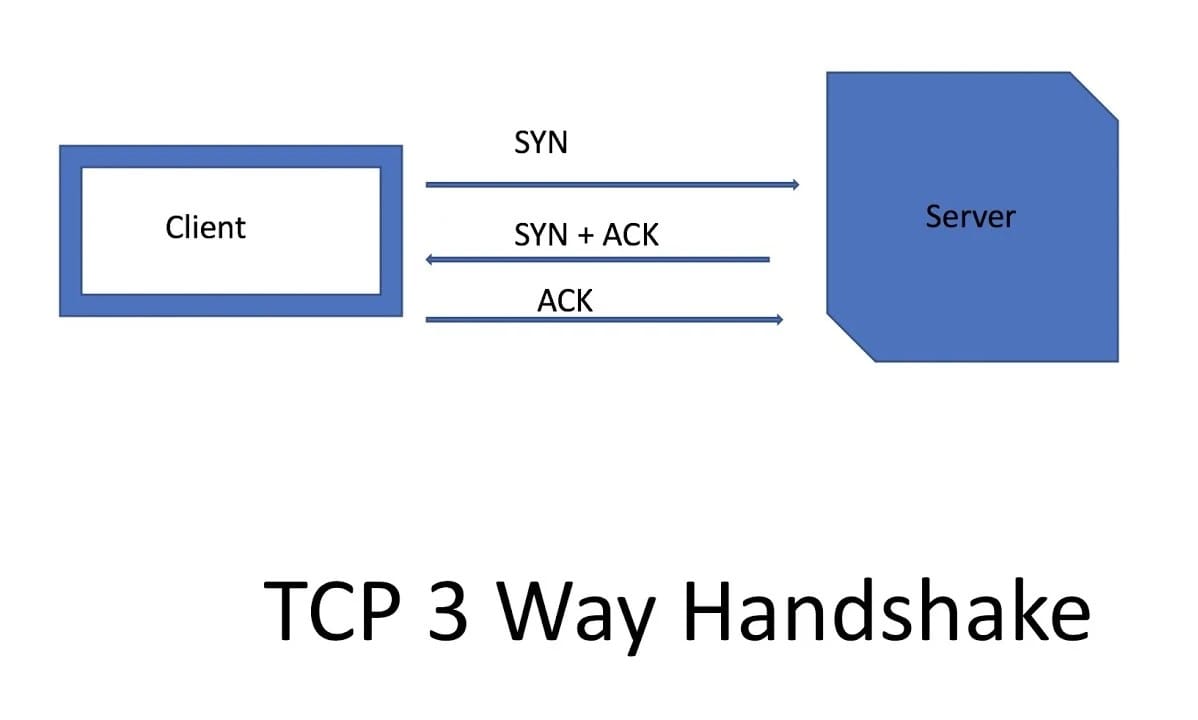
After DNS gives the IP address, the browser starts a TCP connection with the server. This connection is established using a 3-way handshake, which ensures both client and server are ready to communicate.
→ Step 1: Client sends SYN request
→ Step 2: Server replies with SYN-ACK
→ Step 3: Client sends ACK
Once this is complete, the connection is established and data transfer begins. This process ensures reliability before sending actual data.
17. What is TCP 3-way handshake and why is it needed?
The TCP 3-way handshake is a process used to create a reliable connection between client and server before data transfer starts.
→ Synchronizes sequence numbers
→ Confirms both sides are ready
→ Prevents duplicate or lost packets
Without this handshake, data could be lost or received incorrectly. This is why TCP is considered reliable.
18. What is TCP 4-way handshake (connection termination)?
TCP uses a 4-step process to safely close a connection after data transfer is complete.
→ Client sends FIN (finish request)
→ Server sends ACK (acknowledge)
→ Server sends FIN
→ Client sends final ACK
This ensures both sides properly close the connection and no data is lost during termination.
19. What is congestion control in TCP?
Congestion control is a mechanism used by TCP to avoid overloading the network. When too much data is sent at once, packets may be lost.
→ Slow Start: Starts with small data
→ Congestion Avoidance: Gradually increases speed
→ Detects packet loss and reduces speed
This helps maintain a balance between performance and stability in the network.
20. What is DNS caching and why is it important?
DNS caching stores the IP addresses of previously visited websites so the browser does not need to query the DNS server again.
→ Reduces lookup time
→ Speeds up website loading
→ Reduces load on DNS servers
For example, when you visit the same site again, it loads faster because the IP is already stored locally.
21. What is the difference between Layer 4 and Layer 7 load balancing?
| Feature | Layer 4 (Transport Layer) | Layer 7 (Application Layer) |
|---|---|---|
| Based On | IP address & Port | URL, Headers, Cookies |
| Speed | Faster | Slightly slower |
| Intelligence | Low | High |
| Use Case | Basic traffic routing | Microservices, APIs |
→ L4 is faster but less flexible
→ L7 is smarter and used in modern systems
22. What is NAT (Network Address Translation)?
NAT is used to map multiple private IP addresses to a single public IP address. It is commonly used in routers.
→ Saves public IP addresses
→ Hides internal network details
→ Improves security
For example, all devices in your home share one public IP when accessing the internet.
23. What is subnetting and why is it used?
Subnetting is the process of dividing a large network into smaller networks (subnets).
→ Improves network performance
→ Reduces traffic congestion
→ Makes network management easier
For example, a company may divide its network into departments like HR, IT, and Sales.
24. What is ARP and how does it work?
ARP (Address Resolution Protocol) is used to find the MAC address of a device when its IP address is known.
→ Device sends ARP request (broadcast)
→ Target device replies with MAC address
→ Communication begins
It is mainly used inside local networks (LAN).
25. What is the difference between public IP and private IP?
| Feature | Public IP | Private IP |
|---|---|---|
| Access | Internet | Local network |
| Uniqueness | Globally unique | Can be reused |
| Example | 8.8.8.8 | 192.168.1.1 |
→ Public IP connects to internet
→ Private IP works inside local network
26. What is HTTP persistent vs non-persistent connection?
In a non-persistent connection, a new TCP connection is created for every request. In a persistent connection, the same connection is reused.
→ Persistent = Faster, less overhead
→ Non-persistent = Slower, more connections
Modern browsers use persistent connections for better performance.
27. What is SSL/TLS handshake?
SSL/TLS handshake is the process of creating a secure connection between client and server.
→ Server sends certificate
→ Client verifies identity
→ Encryption keys are generated
After this, all communication is encrypted. This is used in HTTPS.
28. What is packet switching vs circuit switching?
| Feature | Packet Switching | Circuit Switching |
|---|---|---|
| Path | Dynamic | Fixed |
| Efficiency | High | Low |
| Example | Internet | Telephone |
→ Packet switching breaks data into small packets
→ Circuit switching uses a fixed path
29. What is CDN and why is it used?
CDN (Content Delivery Network) is a system of distributed servers that deliver content from the nearest location to the user.
→ Reduces latency
→ Faster loading time
→ Handles high traffic
Example: Videos on YouTube load faster due to CDN.
30. What is a proxy server and reverse proxy?
| Feature | Proxy Server | Reverse Proxy |
|---|---|---|
| Works For | Client | Server |
| Purpose | Hide client identity | Protect backend servers |
| Example | VPN | Load balancer |
→ Proxy is used on client side
→ Reverse proxy is used on server side

Advanced Computer Networks Interview Questions
Let’s move to advanced, real interview-level questions. These test how well you understand systems, problem-solving, and real-world applications.
31. What happens when you open google.com in your browser? Explain end-to-end.
When you type google.com, a series of processes occur in the background. Firstly, a check is made to see if there is a cache available. If there is no cache, a DNS request is sent to obtain an IP address. A TCP connection is then established via a 3-way handshake.
Next, an HTTPS connection is established via an SSL/TLS handshake to make the connection secure. An HTTP request is then sent to the server. This request is then processed by Google's servers, and a response is sent back to the client, which is rendered by the browser.
→ DNS lookup
→ TCP connection
→ TLS handshake
→ HTTP request/response
This question checks full understanding of networking + system flow.
32. Why is TCP not used in live streaming or gaming?
TCP is reliable but slower because it ensures all packets are delivered in order. In live streaming or gaming, speed matters more than perfect accuracy.
If a packet is lost in TCP, it retransmits, which causes delay. In real-time systems, waiting for lost packets can create lag.
UDP is preferred because it sends data faster without waiting.
→ TCP = Reliable but slower
→ UDP = Faster but no guarantee
That’s why video calls, live streams, and games use UDP.
33. How does WhatsApp (or chat app) send a message over network?
When a message is sent, the app first connects to a server using TCP or secure protocols. The message is encrypted and sent to the server.
The server identifies the receiver and forwards the message. If the user is offline, the message is stored and delivered later.
→ Client → Server → Receiver
→ Uses encryption (end-to-end)
→ Uses persistent connection
This tests understanding of real-time communication systems.
34. Why does a website sometimes load slow even with high internet speed?
A website can be slow due to multiple reasons, not just internet speed.
Latency plays a big role, if the server is far away, response time increases. DNS lookup delay, server load, or too many resources (images, scripts) can also slow it down.
→ High latency
→ Slow DNS resolution
→ Server overload
→ No caching/CDN
So, bandwidth alone does not guarantee fast performance.
35. How does Netflix or YouTube reduce buffering?
Streaming platforms use multiple techniques to reduce buffering. They use CDN (Content Delivery Network) to serve content from nearby servers.
They also use adaptive bitrate streaming, which adjusts video quality based on internet speed.
→ CDN for low latency
→ Adaptive bitrate (auto quality change)
→ Buffering small chunks
This ensures smooth playback even on slow networks.
36. How does a load balancer decide which server to send request to?
A load balancer distributes traffic across servers using different algorithms.
→ Round Robin (one by one)
→ Least Connections (least busy server)
→ IP Hash (based on user IP)
It checks server health and avoids sending traffic to failed servers. This improves availability and performance.
37. What happens if DNS server is down? How does system handle it?
If a DNS server is down, the system uses backup DNS servers. Browsers and operating systems also use cached DNS records.
If no DNS works, the website cannot be accessed using domain name.
→ Uses DNS cache
→ Switches to secondary DNS
→ May fail if no fallback
This shows fault tolerance in real systems.
38. How does CDN improve performance of a website?
CDN stores copies of content on multiple servers across different locations. When a user requests data, it is served from the nearest server instead of the origin.
This reduces travel time of data and improves speed.
→ Nearest server response
→ Reduces latency
→ Handles global traffic
Used by platforms like YouTube, Netflix, Amazon.
39. How would you design a system to handle millions of requests per second?
To handle large traffic, systems use multiple layers of scaling.
→ Load balancers to distribute traffic
→ Multiple servers (horizontal scaling)
→ Caching (Redis, CDN)
→ Database replication
The idea is to reduce load on a single system and distribute work efficiently.
40. Why do we need caching? Where should caching be applied?
Caching stores frequently used data so it can be accessed faster without hitting the server again.
It can be applied at multiple levels:
→ Browser cache
→ CDN cache
→ Server-side cache (Redis)
Caching reduces latency, improves speed, and lowers server load.
41. What is the difference between REST and gRPC in networking?
| Feature | REST | gRPC |
|---|---|---|
| Protocol | HTTP/1.1 | HTTP/2 |
| Data Format | JSON | Protobuf |
| Speed | Slower | Faster |
| Use Case | Public APIs | Internal services |
REST is simple and widely used, while gRPC is faster and used in microservices communication.
42. How does packet loss affect performance and how is it handled?
Packet loss means some data does not reach the destination. In TCP, lost packets are re-transmitted, which can slow down the system.
In UDP, packets are not re-transmitted, so some data may be missing but performance remains fast.
→ TCP = Reliable but slower
→ UDP = Faster but may lose data
Handling depends on the use case (reliability vs speed).
43. How does rate limiting protect a system?
Rate limiting restricts how many requests a user can send in a given time. It prevents abuse and protects servers from overload.
→ Prevents DDoS attacks
→ Ensures fair usage
→ Protects backend systems
Example: API allows only 100 requests per minute.
44. What is the role of API Gateway in networking?
API Gateway acts as a single entry point for all client requests in a system. It routes requests to the correct service.
It also handles authentication, rate limiting, and logging.
→ Centralized request handling
→ Security and authentication
→ Request routing
Used in microservices architecture.
45. How do microservices communicate in a distributed system?
Microservices communicate over the network using APIs or messaging systems.
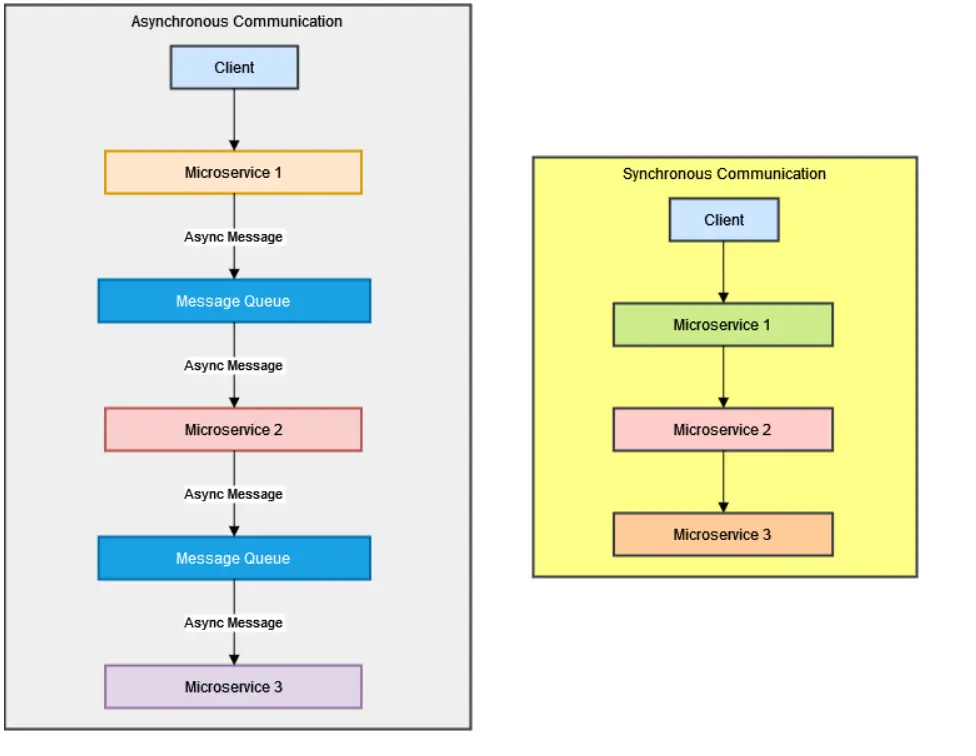
They use protocols like HTTP, gRPC, or message queues (Kafka, RabbitMQ). Communication can be synchronous or asynchronous.
→ REST APIs (simple)
→ gRPC (fast)
→ Message queues (async communication)
This allows systems to scale independently and handle failures better.
Once you have covered advanced topics, it is important to test your knowledge, and a quick free computer networking practice test is available to boost your confidence for interviews.

Final Thoughts
Computer Networks is not only a subject to be memorized but also something that can be used to understand how real-world systems work behind the scenes. Whether it’s loading a website, sending a message, or handling millions of users, networking concepts are being used everywhere.
In this blog, you have covered everything step by step, from basics to intermediate to real interview questions. This type of preparation can really help in building strong concepts.
If your aim is to clear top product-based companies, then it’s really important to move beyond theory. Some key points to focus on would be:
→ Understanding real-world scenarios
→ Practicing interview-style questions
→ Connecting networking with system design
This is where Bosscoder Academy can really help. By following this type of structured learning, real interview practice, and 1: 1 mentorship from experienced mentors, it becomes really easy to build strong concepts and clear interviews.
Keep learning, stay consistent, and focus on understanding rather than memorizing that’s the key to success in top tech companies.
Frequently Asked Questions (FAQs)
Q1. What are the most important computer networks topics for interviews?
The most important computer network interview topics are TCP/IP, OSI model, DNS, HTTP/HTTPS, routing, load balancing, and caching. These topics are usually asked in interviews of product-based companies, and they help you to explain how communication happens in real-world systems.
Q2. How to prepare computer networks for product-based companies?
To prepare computer network interview questions for a product-based company, you should focus on understanding concepts such as TCP handshake, DNS flow, and how the internet works. You should also focus on learning to explain interview questions with real-world scenarios rather than concepts.
Q3. What is the difference between basic and advanced networking questions?
In computer network interview questions, basic questions are usually asked about concepts such as IP address, while advanced questions are asked about real-world scenarios such as system design, system scalability, load balancing, and system performance.
Q4. Are computer networks important for software engineering interviews?
Computer network interview questions are very important for software engineering interviews, especially in backend and system design interview.